The author queue
When you authored the PR — the author banner and walk-the-queue mode for working through incoming feedback.
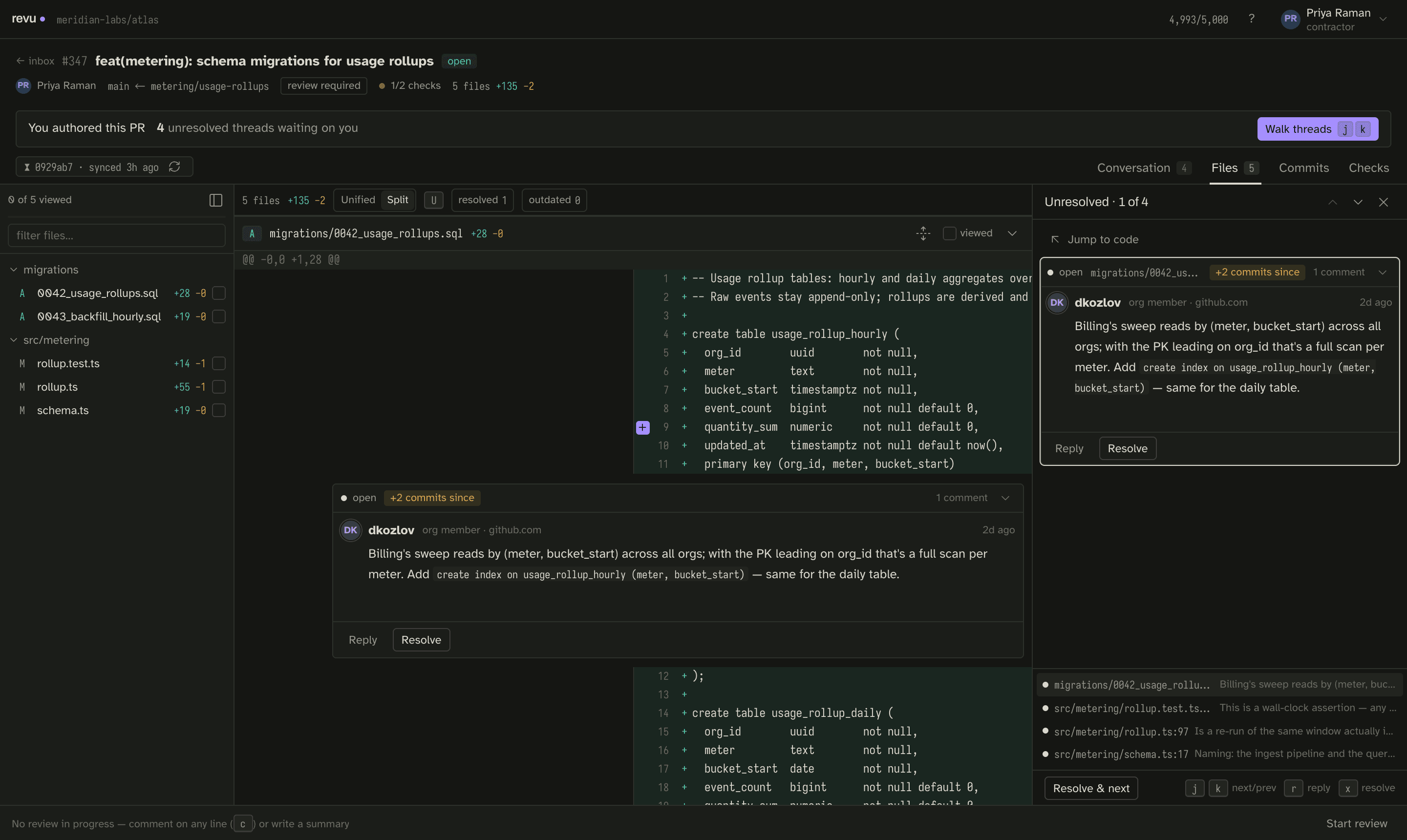
Most of revu is about reviewing other people's code. But you also open PRs, and when reviewers leave threads on yours, you need to work through them. revu detects that you authored the PR and switches the emphasis: instead of a review draft, you get an author banner and a walk-the-queue mode that steps you through every unresolved thread one at a time.
Follow along in mock mode with fixture #347 — a PR you authored, carrying incoming feedback.
The author banner
When you open a PR you authored, a banner across the top says so and surfaces the one number that matters: how many unresolved threads are waiting on you. From the banner you can jump straight into walking them.
Walk the queue
Walk threads puts you in a focused loop over the unresolved threads:
- Start walking from the banner (Walk threads).
- Each step shows one thread — its position in the queue (for example, 1 of 4) and the code it is anchored to. Use Jump to code to see it in context.
- Read it, and reply with Reply if you have something to say. Press
rto reply,n/pto move between threads. - When a thread is handled, Resolve & next resolves it and advances to the following one in a single action.
- The queue empties as you go; the waiting count in the banner ticks down.
This is the same thread machinery used everywhere else — x resolves or reopens
a thread, replies post as single inline comments — just sequenced so you can clear
a stack of feedback without hunting for each thread in the tree.
Identity of your replies
In direct mode your replies and resolutions post to GitHub as your real account, and you cannot approve your own PR — Approve is gated on #347 for exactly that reason (see Submitting a review). In the reserved broker mode, replies would post under the shared bot identity stamped with your name; broker mode is designed but not runnable today.
Next
- Handle threads on other people's PRs with the same tools from Writing inline comments.
- Keep the waiting count visible from the inbox.