Triaging the inbox
Read the inbox sections that surface what needs doing today, starting with the unresolved count on your own PRs.
The inbox is the pull-request list, but it is not sorted by date. It is sorted by what needs doing today — grouped into sections, loudest first. Reading it well is how you decide what to open next.
Press g then i to reach the inbox from anywhere.
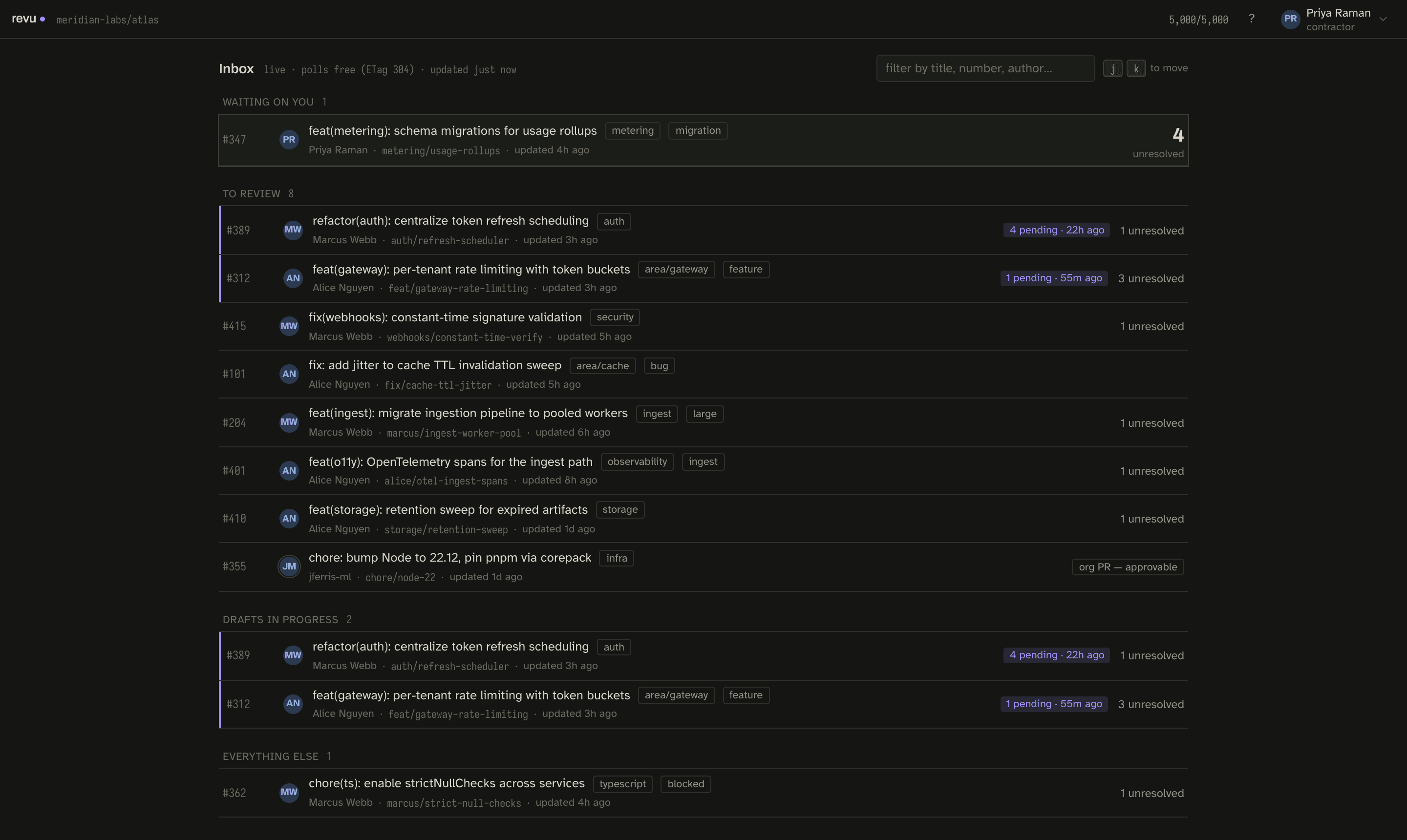
The sections
The list breaks into sections, ordered by urgency:
| Section | What it holds |
|---|---|
| Waiting on you | PRs you authored that have unresolved threads waiting on your reply. The loudest section. |
| To review | PRs assigned to you or otherwise needing your review, each with its unresolved-thread count. |
| Drafts in progress | PRs where you have a saved local draft you have not submitted yet. |
| Everything else | Open PRs that do not currently need anything from you. |
The loudest number on screen
Each row shows an unresolved count on the right. The unresolved count on your own PRs is deliberately the loudest number on the screen: it is the work that is blocking someone else. When a row in Waiting on you shows a count, that is a thread a reviewer left that you have not answered — open it and walk the queue.
Each row also carries the repo, the base and head branches, labels, and how long ago it was updated — enough to decide whether to open it without syncing.
What the inbox costs
The inbox is the one surface that keeps polling while it is open. It refreshes
against GitHub's PR list with a conditional request, so an unchanged list comes
back as a free 304 and costs nothing against the rate budget. Opening a PR is
what triggers a sync — the expensive part — so triage
is cheap and deliberate: you read the inbox, then choose what to pull down. See
the rate budget for the full accounting.
A triage pass
- Press
gi. - Clear Waiting on you first — those threads block other people.
- Work To review, highest unresolved counts first.
- Resume anything in Drafts in progress you meant to finish.
- Open a PR with
↵to sync and review it.
Next
- Sync and read your first PR: Your first sync.
- Answer feedback on PRs you authored: The author queue.